
body { font-family: -apple-system, BlinkMacSystemFont, "Segoe UI", Helvetica, Arial, sans-serif; background-color: var(--bg-color); color: var(--text-color); margin: 0; display: flex; } #sidebar { width: 280px; height: 100vh; background: var(--sidebar-bg); border-right: 1px solid var(--border-color); position: fixed; padding: 20px; overflow-y: auto; } #sidebar-logo img { width: 150px; margin-bottom: 20px; } .lang-selector { margin-bottom: 20px; } .lang-selector a { margin-right: 10px; color: var(--text-color); text-decoration: none; font-size: 12px; } .lang-selector a.active { font-weight: bold; color: var(--accent-color); } #menu { list-style: none; padding: 0; } #menu li { margin-bottom: 10px; } #menu a { color: var(--text-color); text-decoration: none; font-size: 14px; display: flex; align-items: center; } #menu a:hover { color: var(--header-color); } #menu a.active { font-weight: bold; color: var(--header-color); border-left: 2px solid var(--header-color); padding-left: 10px; } #menu a i { margin-right: 12px; font-style: normal; font-size: 18px; width: 24px; text-align: center; display: inline-block; } #content { margin-left: 320px; padding: 40px; max-width: 900px; } h1, h2, h3 { color: var(--header-color); } img { max-width: 100%; border-radius: 8px; margin: 10px 0; } /* SECTION 5: CONTROL ZONE */ .integration-card { display: flex; align-items: flex-start; gap: 20px; padding: 18px 24px; background: rgba(255, 255, 255, 0.05); border-radius: 4px 12px 12px 4px; border: 1px solid rgba(255, 255, 255, 0.1); margin-bottom: 12px; transition: all 0.3s ease; } .card-serato { border-left: 6px solid #007AFF !important; background: rgba(0, 122, 255, 0.05) !important; } .card-rekordbox { border-left: 6px solid #34C759 !important; background: rgba(52, 199, 89, 0.05) !important; } .card-vdj { border-left: 6px solid #FF2D55 !important; background: rgba(255, 45, 85, 0.05) !important; } .icon-wrapper { width: 64px; height: 64px; background: #fff; border: 1px solid rgba(255,255,255,0.1); border-radius: 50%; display: flex; align-items: center; justify-content: center; min-width: 64px; box-shadow: 0 4px 12px rgba(0,0,0,0.4); } .icon-wrapper img { width: 45px; border: none; box-shadow: none; margin: 0; } .command-grid { display: grid; grid-template-columns: repeat(3, 1fr); gap: 20px; margin-top: 25px; } .command-card { background: rgba(255,255,255,0.02); border: 1px solid rgba(255,255,255,0.1); padding: 15px 20px; border-radius: 12px; display: flex; align-items: center; gap: 18px; transition: all 0.3s ease; min-height: 85px; } .cmd-blue { border: 1px solid rgba(0, 122, 255, 0.3) !important; background: rgba(0, 122, 255, 0.05) !important; } .cmd-purple { border: 1px solid rgba(175, 82, 222, 0.3) !important; background: rgba(175, 82, 222, 0.05) !important; } .cmd-orange { border: 1px solid rgba(255, 149, 0, 0.3) !important; background: rgba(255, 149, 0, 0.05) !important; } .cmd-green { border: 1px solid rgba(52, 199, 89, 0.3) !important; background: rgba(52, 199, 89, 0.05) !important; } .cmd-teal { border: 1px solid rgba(48, 209, 232, 0.3) !important; background: rgba(48, 209, 232, 0.05) !important; } .cmd-red { border: 1px solid rgba(255, 45, 85, 0.3) !important; background: rgba(255, 45, 85, 0.05) !important; } .command-card:hover { background: rgba(255,255,255,0.06); transform: translateY(-2px); border-color: rgba(255,255,255,0.2); } .command-card .icon-circle { width: 48px; height: 48px; background: #fff; border-radius: 50%; display: flex; align-items: center; justify-content: center; flex-shrink: 0; box-shadow: 0 4px 10px rgba(0,0,0,0.3); } .timeline-container { position: relative; padding-left: 20px; border-left: 1px solid var(--border-color); } .timeline-item { margin-bottom: 20px; position: relative; } .timeline-marker { position: absolute; left: -28px; width: 16px; height: 16px; background: var(--bg-color); border: 2px solid var(--accent-color); border-radius: 50%; } .indicator-dot { width: 24px; height: 24px; border-radius: 50%; color: white; display: flex; align-items: center; justify-content: center; font-weight: 900; font-size: 11px; position: absolute; z-index: 20; } .alert { padding: 15px 25px !important; border-radius: 8px !important; color: #000000 !important; margin-top: 30px !important; margin-bottom: 25px !important; position: relative; box-shadow: 0 4px 15px rgba(0,0,0,0.1); display: flex !important; align-items: center !important; gap: 20px !important; border: 1.5px solid rgba(0,0,0,0.05) !important; } .alert-important, .alert-warning { background: linear-gradient(90deg, #FF8800 0%, #FFB100 100%) !important; } .alert-note { background: rgba(52, 199, 89, 0.1) !important; /* Premium Mint Opacity */ border: 1.5px solid rgba(52, 199, 89, 0.2) !important; } .alert-protocol { background: rgba(0, 122, 255, 0.1) !important; /* Premium Blue Opacity */ border: 1.5px solid rgba(0, 122, 255, 0.3) !important; color: #ffffff !important; } .alert-protocol .alert-badge { background: #007AFF !important; color: #ffffff !important; } .alert-protocol b, .alert-protocol strong { color: #58a6ff !important; } .alert b, .alert strong { color: #000000 !important; text-transform: uppercase; letter-spacing: 0.5px; font-size: 13px; font-weight: 800; } .alert-badge { background: #1a1505 !important; color: #ffffff !important; padding: 4px 12px !important; border-radius: 6px !important; font-size: 10px !important; font-weight: 800 !important; display: flex !important; align-items: center !important; gap: 8px !important; text-transform: uppercase !important; letter-spacing: 1px !important; min-width: fit-content !important; } /* EXCEL-STYLE LIGHT TABLES */ .excel-table table { width: 100% !important; border-collapse: collapse !important; background: #ffffff !important; color: #000000 !important; margin: 20px 0 !important; border: 1px solid #ddd !important; border-radius: 8px !important; overflow: hidden; font-size: 13px !important; } .excel-table th { background: #f8f9fa !important; color: #333333 !important; padding: 12px 15px !important; text-align: left !important; font-weight: 800 !important; text-transform: uppercase !important; border: 1px solid #ddd !important; } .excel-table td { padding: 12px 15px !important; border: 1px solid #eee !important; line-height: 1.4; } .excel-table tr:nth-child(even) { background: #fafafa !important; } .alert-icon { display: none !important; } .process-item { display: flex; align-items: center; gap: 25px; padding: 18px 24px; margin-bottom: 15px; border-radius: 12px; background: rgba(255, 255, 255, 0.05); border: 1px solid rgba(255, 255, 255, 0.1); transition: all 0.3s cubic-bezier(0.4, 0, 0.2, 1); } .step-blue { background: rgba(0, 122, 255, 0.1) !important; border-color: rgba(0, 122, 255, 0.2) !important; } .step-purple { background: rgba(175, 82, 222, 0.1) !important; border-color: rgba(175, 82, 222, 0.2) !important; } .step-orange { background: rgba(255, 149, 0, 0.1) !important; border-color: rgba(255, 149, 0, 0.2) !important; } .step-green { background: rgba(52, 199, 89, 0.1) !important; border-color: rgba(52, 199, 89, 0.2) !important; } .step-teal { background: rgba(48, 209, 232, 0.1) !important; border-color: rgba(48, 209, 232, 0.2) !important; } .step-red { background: rgba(255, 45, 85, 0.1) !important; border-color: rgba(255, 45, 85, 0.2) !important; } .process-item:hover { background: rgba(255, 255, 255, 0.08); transform: translateX(5px); } .process-circle { min-width: 36px; height: 36px; border-radius: 50%; display: flex; align-items: center; justify-content: center; font-weight: 900; font-size: 16px; color: #ffffff; box-shadow: 0 4px 12px rgba(0,0,0,0.4); border: 2px solid rgba(255,255,255,0.8); } /* FINGERPRINT ICON SUPPORT */ .process-circle.huella { background-image: url('data:image/svg+xml;utf8, ') !important; background-size: 65%; background-repeat: no-repeat; background-position: center; color: transparent !important; } .process-content { flex: 1; font-size: 14px; line-height: 1.6; } .process-content strong { color: #58a6ff; text-transform: uppercase; font-size: 13px; font-weight: 800; display: block; margin-bottom: 4px; letter-spacing: 0.5px; } /* Step Colors */ .step-blue .process-circle { background: #007AFF !important; } .step-purple .process-circle { background: #AF52DE !important; } .step-orange .process-circle { background: #FF9500 !important; } .step-green .process-circle { background: #34C759 !important; } .step-teal .process-circle { background: #30D1E8 !important; } .step-red .process-circle { background: #FF2D55 !important; } /* SECTION CORPORATE (Light Print / Dark Web) */ #content .section-corporate { position: relative; padding: 30px; border-radius: 12px; background-color: transparent; transition: all 0.3s ease; z-index: 1; overflow: hidden; } #content .section-corporate h1 { background: linear-gradient(180deg, rgba(31, 36, 44, 0.5) 0%, rgba(31, 36, 44, 1.0) 100%) !important; backdrop-filter: blur(10px) !important; -webkit-backdrop-filter: blur(10px) !important; color: #ffffff !important; padding: 15px !important; text-align: center !important; border-radius: 8px !important; font-size: 24px !important; font-weight: 800 !important; text-transform: uppercase !important; margin-bottom: 30px !important; border: 1px solid rgba(255,255,255,0.1) !important; } #content .section-corporate table { width: 100% !important; border-collapse: collapse !important; background: rgba(255,255,255,0.02) !important; margin: 20px 0 !important; border: 1px solid rgba(255,255,255,0.2) !important; } #content .section-corporate th { background: linear-gradient(180deg, rgba(45, 51, 59, 0.5) 0%, rgba(45, 51, 59, 1.0) 100%) !important; color: #58a6ff !important; padding: 14px 15px !important; text-align: left !important; font-size: 14px !important; text-transform: uppercase !important; border: 1px solid rgba(255,255,255,0.2) !important; } #content .section-corporate td { padding: 12px 15px !important; border: 1px solid rgba(255,255,255,0.2) !important; font-size: 14px !important; } #content .section-corporate tr:nth-child(even) { background: rgba(255,255,255,0.08) !important; } #content .section-corporate .label-700 { font-weight: 700; color: #58a6ff; } #content .section-corporate .requirement-text { font-weight: 500; } @media print { #content .section-corporate { background-color: #ffffff !important; color: #000000 !important; } #content .section-corporate h1 { background: #f0f0f0 !important; color: #000000 !important; border: 1px solid #ddd !important; } #content .section-corporate table { background: #ffffff !important; border: 1px solid #000000 !important; } #content .section-corporate th { background: #f8f9fa !important; color: #333 !important; border: 1px solid #000000 !important; border-bottom: 2px solid #000000 !important; } #content .section-corporate td { border: 1px solid #000000 !important; color: #333 !important; } #content .section-corporate tr:nth-child(even) { background: #fdfdfd !important; } }

General Introduction – MDJPRO

πŸ‘οΈ NOTE
**IMPORTANT NOTICE:** MDJPRO works directly with real system files and structures. Although the software has been designed with security protocols, **final responsibility for correct use lies with the user.** It is always recommended to work with backups.

Introduction

MDJPRO (Magic DJ Pro) is a professional platform for music management, auditing and organization designed for DJs, producers and event operators working under real industry standards.

Developed by Miami DJ Beat, MDJPRO is not a player, nor a simple file organizer. It is a music library control system created to protect, structure and optimize one of a professional DJ's most valuable assets: their music database.

In an environment where organization errors, corrupt metadata or incorrect scans can compromise a live performance, MDJPRO acts as an operational firewall between hard drive chaos and the stability required by softwares like Serato DJ, Rekordbox and VirtualDJ.

System Philosophy

MDJPRO is built on a fundamental principle:

"Professional music is not improvised. It is structured, validated, and protected."

For this reason, the application operates through controlled workflows, clear rules, and constant validations. Every action within the systemβ€”from loading a root folder to editing metadataβ€”responds to a logic designed to prevent human errors, data loss, and progressive disorganization.

MDJPRO does not replace DJ software. It prepares it, feeds it correctly, and keeps it stable.

Who is MDJPRO for?

If your music is part of your professional identity and your livelihood, MDJPRO was designed for you.

What MDJPRO Solves

The system introduces order, traceability and control without interfering with the DJ's creative flow.

Welcome to MDJPRO

The most advanced software engineering solution for intelligent music library management on macOS.

Your New Standard:

Designed for professional DJs and collectors who demand perfection in the organization of their metadata. MDJPRO does not just organize; it transforms your workflow through DNA algorithms and unprecedented automation.

How to use this manual

This manual has been designed as a technical and operational guide, not as promotional material. Here you will find clear explanations of each module, usage rules, critical warnings, recommended workflows, and professional best practices.

It is recommended to read the entire manual before using advanced functions, especially those that interact with folder structures and metadata.


Β© 2026 MDJPRO – Official Documentation.


1. SYSTEM REQUIREMENTS – MDJPRO

COMPONENT REQUIREMENT
Operating System macOS 12 (Monterey) or higher. macOS 14 (Sonoma) Recommended.
Processor Apple Silicon Only (M1, M2, M3, M4). Intel Macs NOT supported.
Memory (RAM) 8 GB Minimum. 16 GB Recommended for large libraries (>50k songs).
Storage SSD Required for hosting the library.
Supported Formats MP3, AAC, WAV, AIFF, MP4, MOV.
DJ Software Serato DJ Pro (100% Native). Compatible with Rekordbox and VirtualDJ.
πŸ›‘οΈ
πŸ‘ ALERT PROTOCOLS
Recommended Operating System: macOS 14 (Sonoma) or higher.
⚠️
⚠️ ALERT WARNING
The use of non-certified hardware (e.g. Intel Macs) may result in latency or graphical instability.

Β© 2026 MDJPRO – Official Documentation.


2. Installation – MDJPRO

πŸ‘ NATIVE INSTALLER
Standard Apple Process (PKG).
MDJPRO PKG ICON
1
**INSTALLER EXECUTION:** Double-click the downloaded MDJPRO_Installer.pkg file. The native Apple assistant will start to guide you safely.
2
**LICENSE AGREEMENT:** Read the EULA terms. You must click 'Agree' to confirm your compliance with the usage and privacy policies.
3
**SECURE AUTHENTICATION:** macOS will request administrator permissions. Use your Fingerprint (Touch ID) or password to authorize writing to the Applications folder.
4
**SUCCESSFUL INSTALLATION:** Upon completion, you will see a message with a Green Check. The MDJPRO application is now ready on your system.
⚠️
WARNING
PRIVACY AND SECURITY: The application will remain LOCKED after installation until a valid license is activated.

Β© 2026 MDJPRO – Official Documentation.


3. First Steps – MDJPRO

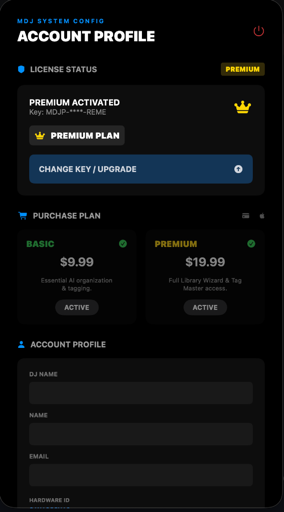
This section guides the user through the registration, activation, and license validation process. The activation architecture links your license to your Mac's unique Hardware ID to ensure your subscription's security.
βš–οΈ
LEGAL REQUIREMENT
The license is non-transferable and subject to Miami DJ Beat LLC's EULA terms.
πŸ‘ ACTIVATION PANEL
VISUAL GUIDE
MDJPRO license management interface.
1
ACTIVE STATUS INSTANT VALIDATION INDICATOR. CONFIRMS THE SOFTWARE IS AUTHORIZED FOR COMMERCIAL USE.
2
LICENSE INPUT ENTERPRISE KEY INSERTION. VALIDATED ATOMICALLY AGAINST THE SECURITY SERVER.
3
PLAN SELECTION SERVICE LEVEL SELECTOR (STANDARD/PREMIUM). DETERMINES UNLOCKED FEATURES.
4
USER DATA PROFILE LINKED TO THE CURRENT WORKSTATION (LEGAL OWNER).
1
2
3
4
⚠️
WARNING
LEGAL REQUIREMENT: The license is non-transferable and subject to Miami DJ Beat LLC's EULA terms.

Β© 2026 MDJPRO – Official Documentation.


4. User Interface – MDJPRO

INTERFACE ARCHITECTURE:

The Command Hub is the central operations interface. Its unified architecture allows for real-time command execution and status monitoring, eliminating navigation through deep menus.
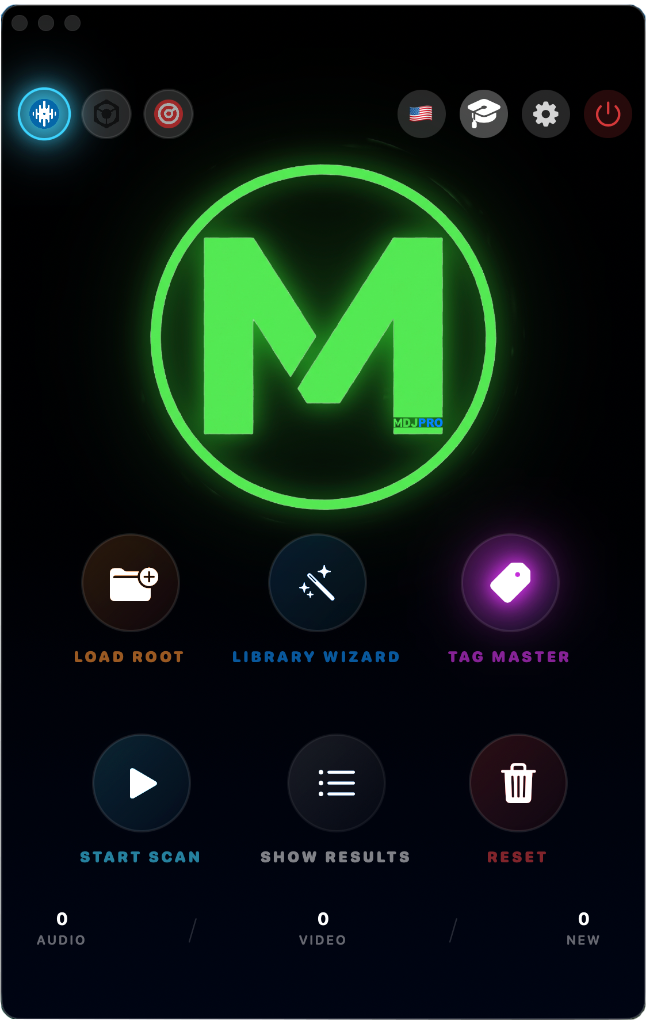
COMMAND HUB PANEL
VISUAL GUIDE
MDJPRO control and monitoring architecture.
1
2
4
3

Figure 4.1: Command Hub Overview

1
Command Bar (Top Bar) Software Selector (Serato, RB, VDJ), Language, Web Access, Academy, and Safe Shutdown.
2
Central Panel (Dashboard) Primary commands: Load Root, WizardDNA, Tag Master, and Start Scan.
3
Metrics (Counters) Real-time status visualization and scan results.
4
Metronome Zone Collection status: Total items, Music, Video, and New additions.
πŸ›‘οΈ PROTOCOL
**IMPORTANT:** The Control Panel is the operative heart. Monitor 'New' metrics to verify your imports in real time.
πŸ”Ή WARNING
**WARNING:** The Software Selector in the Top Bar reconfigures the validation algorithm based on the destination (e.g., Serato vs Rekordbox).

Β© 2026 MDJPRO – Official Documentation.


5. CONTROL PANEL – MDJPRO

Compatible with leading DJ software platforms

Serato DJ Pro
SERATO DJ:

Native Integration: The system replicates the directory structure as Crates and Subcrates, maintaining the original hard drive hierarchy.

Rekordbox
REKORDBOX:

XML Bridge Protocol: Requires enabling 'rekordbox xml' in Preferences > View. Allows for structure importation via Drag & Drop.

Virtual DJ
VIRTUAL DJ:

Virtual Folders Support: The software recognizes the pre-analyzed database as an extension of the file system, optimizing read times.

This interface guarantees full control and instant access to the system's vital functions.
πŸ“
1. LOAD ROOT
Select your master folder.
πŸͺ„
2. WIZARD
Smart folder creator.
🏷️
3. TAG MASTER
Massive metadata editor.
▢️
4. START SCAN
Inject folders into Serato/VDJ.
πŸ“‹
5. RESULTS
Detailed process report.
πŸ—‘οΈ
6. RESET
Clear local database.

Β© 2026 MDJPRO – Official Documentation.

πŸ”Ή IMPORTANT
**WARNING:** The 'Reset' command does not delete files from disk; it only clears the current work session.

Β© 2026 MDJPRO – Official Documentation.


6. Library and Organization πŸ”’ PREMIUM ONLY

LIBRARY WIZARD (Structure Manager): (Premium Subscription Only) Automation module that generates standardized directory hierarchies on the physical drive.
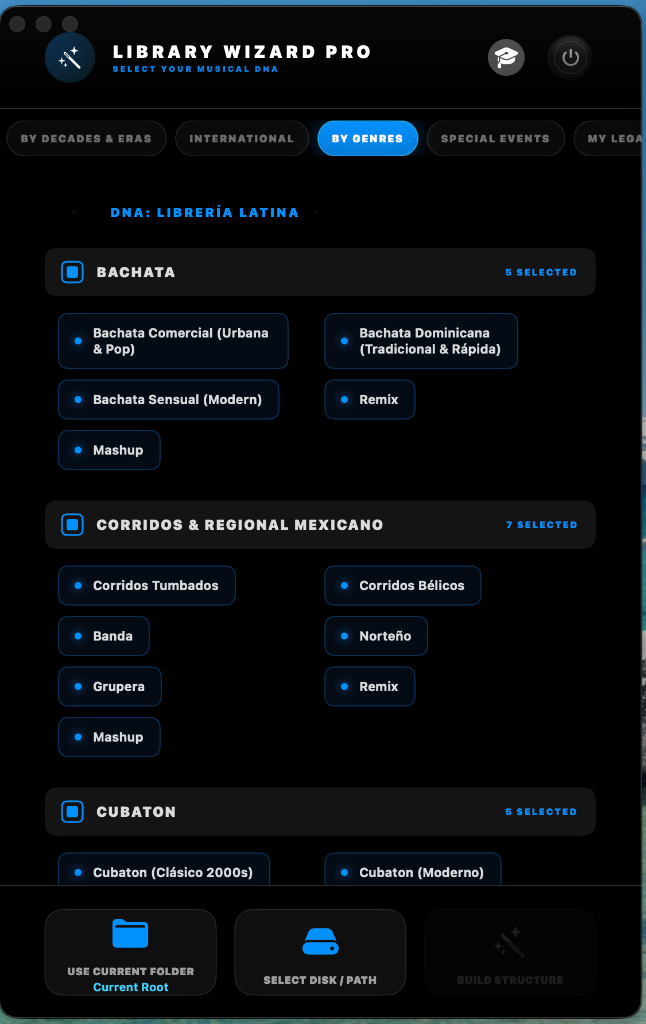
Library Wizard Pro DNA

FOLDER SPECIFICATIONS (DNA)

1
DECADES (CHRONOLOGICAL) Segregates content by eras (70s, 80s, 90s). Ideal for 'Open Format' sessions where time-based navigation is priority.
2
INTERNATIONAL (REGIONS) Organization by origin or macro-regions (Latin, Euro, Afro). Isolates cultural trends while maintaining regional independence.
3
BY GENRES (TECHNICAL) Groups files by fundamental sonic characteristics (House, Techno, Urban) regardless of their era or origin.
4
SPECIAL EVENTS (MOBILE DJ) Designed for specific events (Weddings, Corporate) where operational functionality takes precedence over musical genre.
5
MY LEGADO (HERITAGE) Long-term repository for high-value material (Vinyl Rips, Masters). Prioritizes file integrity over fast access.
6
PERFORMANCE SET Low-latency environment optimized for routines, tone-play and competition. Contains only material verified for 'Stage'.

Deployment Flow (Wizard Architecture)

graph LR A[Start Wizard] --> B{Root?} B -->|Current| C[Build Repo] B -->|Select| D[Select Drive] D --> C C --> E[Verify Meta] E --> F[Deploy Structure] F --> G[Finish] style A fill:#161b22,stroke:#58a6ff style G fill:#238636,stroke:#fff
DEPLOYMENT ACTIONS (COMMANDS)
1
CURRENT ROOT: Creates preset structure in the current folder.
2
SELECT DRIVE: Defines the custom target root folder.
3
BUILD: Starts the directory hierarchy injection.
πŸ“
USE CURRENT ROOT
Current Root
1
πŸ’½
SELECT DRIVE / PATH
Select Drive
2
πŸͺ„
BUILD STRUCTURE
Build Structure
3
⚠️
ALERT WARNING

Do not mix architectures without planning. Select a primary DNA for the 'Root' and use the others as sub-structures only if strictly necessary to avoid database fragmentation.


Β© 2026 MDJPRO – Official Documentation.


7. Editor Tag – MDJPRO

METADATA EDITOR (ID3):

Advanced tag management for library standardization. Changes are destructive and physically written to the asset to guarantee universal compatibility with DJ software.
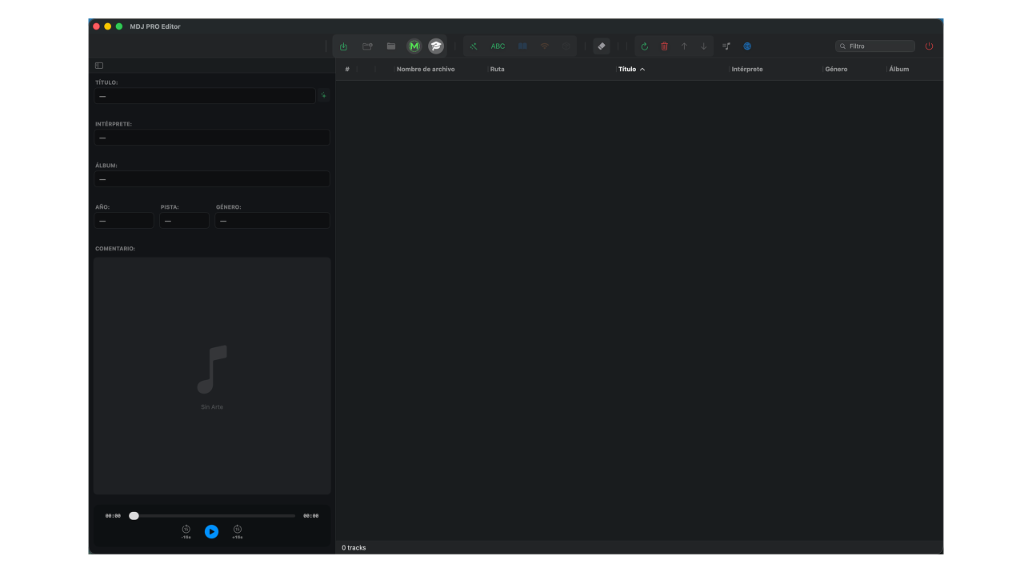
πŸ‘ METADATA EDITOR (TAG MASTER)
VISUAL GUIDE
Atomic metadata editing interface.
1
PRIMARY EDITOR Central field for metadata (Title, Artist, Album) with real-time validation.
2
TOOLBAR Quick access to search, filtering and batch processing functions.
3
VISUALIZATION GRID Dynamic table showing the current status of loaded files.
4
PATH & STATISTICS Absolute location monitor and processed assets counter.
5
MULTIMEDIA SUPPORT Cover art viewer and integrated pre-listen player.
1
2
3
4
5
⚠️
IMPORTANT: DESTRUCTIVE CHANGES
Editor Tag edits modify the source file permanently. They cannot be undone after writing. Always verify metadata integrity before final ingestion.

Β© 2026 MDJPRO – Official Documentation.


8. Operative Mode – MDJPRO

MDJPRO library management is based on an atomic and sequential workflow. The Metadata Editor is the centerpiece where assets are refined before their final distribution.

Editor Anatomy

EDITING ZONE (CLEANING)

7 editing fields + Magic Emoji Cleaner. Allows normalizing Title, Artist, Album, and Comments.

VISUALIZATION ZONE

Real-time metadata monitor: Cover Art, Absolute Path, Bitrate, Duration, and Key.

πŸ’‘ Adjustable columns for total customization.
LOCATION & STATISTICS

Track counters and active path monitor at the bottom of the editor.

MULTIMEDIA (VIDEO & ART)

Cover art viewer and MP4 video playback with touch scrubbing support.

Workflow Tools

πŸ’Ύ
SAVE CHANGES: Physical writing of ID3 tags.
πŸ“
IMPORT: Bulk loading of assets to the Sandbox.
βš™οΈ
MDJ DISTRIBUTION: Starts the intelligent classification algorithm.
πŸͺ„
AUTO-TAG: Atomic cleaning of special characters (; : ' ").
ABC
FILENAME TO TAG: Mapping filename to ID3 fields.
🧼
MAGIC ERASER: Batch removal of configurable strings.
πŸ”„
SYNC: Volume re-scanning to detect external changes.
βš–οΈ
WORK PROTOCOLS
Maintain a unidirectional flow. Do not modify files externally during the MDJPRO processing stage.

Β© 2026 MDJPRO – Official Documentation.


9. Keyboard Shortcuts – MDJPRO

Optimize your workflow by using quick commands. These combinations allow you to execute critical actions without interrupting your mixing or editing session.

Essential Commands List

Confirm / Save Changes Enter
Play / Pause (Preview) Space
Vertical Navigation ↑ / ↓
Select All Cmd + A
Force Directory Reload Cmd + R
Locate Track in Finder Cmd + Ctrl + R
Alternate Multiple Selection Cmd + Click
Cancel action or close modal Esc
πŸ’‘
PRO TIP

Constant use of shortcuts reduces library preparation time by 40%. It is recommended to memorize the navigation and saving commands.


Β© 2026 MDJPRO – Official Documentation.


10. Actions and Reports – MDJPRO

RESULTS PANEL:

The MDJPRO monitoring center provides a detailed report of the library status and system integrity after each scan or distribution operation.
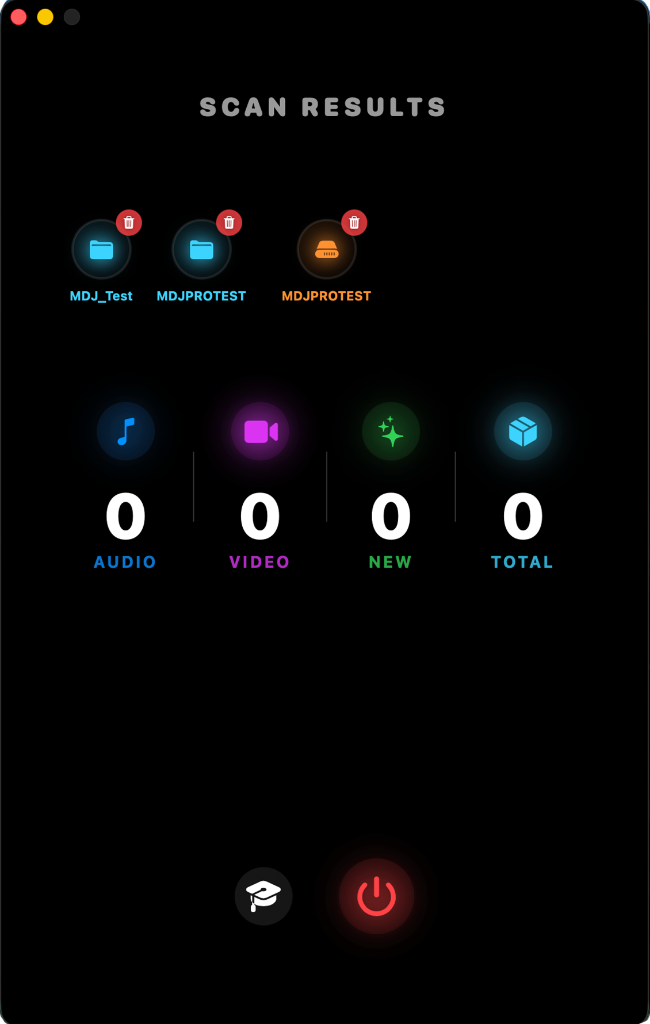
πŸ‘ RESULTS AND CONTROL PANEL
VISUAL GUIDE
Process control and database management.
1
DATABASE MANAGER Management of 'Master' folders. Allows deleting records from the folder and file database.
2
FILE COUNTER Current inventory of Audio/Video files. Optimizes workflow by avoiding redundant scans.
3
TUTORIALS Access to the Quick Functions Guide and interactive setup assistant.
4
SECURE SHUTDOWN Finalizes active processes and data integrity for a clean app exit.
1
2
3
4
πŸ›‘οΈ
ESTABLISHED PROTOCOLS
β€’ START SCAN: Initiates the final structural injection processing.
β€’ SHOW RESULTS: Detailed report of operation and error detection.
β€’ RESET SYSTEM: Resets all parameters to factory state.
⚠️
WARNING

The system automatically omits system folders or hidden files to prevent macOS database corruption and integrity failures.


Β© 2026 MDJPRO – Official Documentation.


11. Visual Function Guide – MDJPRO

Quick reference of the main software interfaces. This ecosystem ensures a unified workflow from activation to final export.

1
Welcome Screen

Opening screen. Identifies your version and confirms your identity as an official user.

2
Account / Start

Subscription management, license activation, and Premium status verification.

3
Command Hub

Primary launchpad for Library Wizard, Tag Master, and Drive Management.

4
Scan Engine

Real-time reports. View processed files, new additions, and integrity alerts.

5
Protocols & Status

Integrity control center. Manages status lights, Apple permissions (The Key), and Serato Link.

V3 / Anti-F
6
Tag Master

The metadata editor brain. ID3 standardization compatible with Serato and Rekordbox.

πŸ’‘
VISUAL CONSISTENCY

All interfaces use Apple's unified rendering engine to ensure sharpness on Retina displays and optimal performance.


Β© 2026 MDJPRO – Official Documentation.


12. File & Media Engine – MDJPRO

MDJPRO employs a 'Zero Trust' policy for multimedia files to prevent database corruption and ensure stability during live sessions.

Granular Column Control

COLUMN DESCRIPTION EDITABLE? RISK LEVEL
Filename Physical name on the hard drive. βœ… YES MEDIUM
Title / Artist Internal ID3 metadata of the asset. βœ… YES SAFE
Path Absolute location in the system. 🚫 NO SYSTEM
⚠️
TECHNICAL WARNING

Renaming files that are already part of Serato Crates without using MDJPRO's "Serato Link" feature will result in Missing Files.

Eligible Formats Matrix

FORMAT STATUS TECHNICAL SPECIFICATION
MP4 ELIGIBLE Standard MPEG-4 Part 14 container.
MOV ELIGIBLE Apple QuickTime Movie (Native macOS).
M4V ELIGIBLE iTunes / Apple Ecosystem Video.
MKV / AVI BYPASS Formats omitted for structural security.
πŸ›‘οΈ
DRY-RUN PROTOCOLS: ATOMIC VALIDATION
β€’ 'moov' atom verification.
β€’ EOF (End Of File) integrity validation.
β€’ Structural metadata and offset consistency.
🚫
Security Lockout If a file fails the **Dry-Run**, MDJPRO will refuse to process it to prevent external database corruption.

Β© 2026 MDJPRO – Official Documentation.


13. Security & Best Practices – MDJPRO

The integrity of your music library is our top priority. MDJPRO implements multiple security layers to ensure a stable and risk-free operation.

πŸ›‘οΈ Apple Sandbox Protocol

MDJPRO operates under secure isolation. External drive access requires **explicit authorization** via persistent security-scoped bookmarks (SSB).

πŸ”‘ Keychain Authorization (Biometry)

Your SaaS credentials are stored in the encrypted macOS Keychain. On first launch, macOS will request **Touch ID or Password** to create a silent security context.

πŸ’Ž 'BINGO' Status (Integrity)
  • βœ”οΈ Active Write Permissions.
  • βœ”οΈ Path physically validated.
  • βœ”οΈ 1:1 Integrity Hash confirmed.
πŸ‘‘

Golden Rules

Critical infrastructure recommended for MDJPRO Enterprise.

MANDATORY
1
Hardware: Use official Thunderbolt or USB-IF Certified cables to prevent voltage drops.
2
Power: Keep UPS (Uninterruptible Power Supply) charged to protect the database against power cuts.
3
Environment: Check temperature (Max 30Β°C for NVMe drives) to prevent thermal throttling.
4
Protocol: Never disconnect volumes during active indexing processes.
βš–οΈ
MDJPRO SECURITY PROTOCOLS
Non-compliance with golden rules may invalidate automated data recovery warranties provided by the MDJPRO engine.

Β© 2026 MDJPRO – Official Documentation.


14. Troubleshooting – MDJPRO

Technical guide for incident resolution and standard terminology within the MDJPRO ecosystem.

Incident Resolution Guide

πŸ”΄
Permissions Error: Disk access has expired due to macOS security policies.
➜ Action: Run the **'Load Root'** function again to renew the SSB bookmark.
πŸ“‚
Missing Files: The physical file path has changed outside of MDJPRO.
➜ Action: Use the **'Relocate'** feature in your DJ software or re-import the Master folder.
🎬
Video Failure: Incompatible codec for the native AVFoundation engine.
➜ Action: Re-encode to **H.264/AAC** using standard tools (e.g., Handbrake).
πŸ”‘
License Error: Validation server communication failure.
➜ Action: Check your internet connection and re-enter credentials in the **Account** panel.

Technical Glossary

ASSET: Individual media file unit (Audio/Video).

CRATE: Logical organization container specific to Serato DJ.

ID3 TAG: Industrial metadata standard embedded in files.

ROOT: Root directory or mount point for a data volume.

SANDBOX: Native macOS security mechanism for process isolation.

XML: Markup language used for database exchange.

πŸ›‘οΈ
SUPPORT PROTOCOLS
In case of persistent erratic behavior, restart the application to clear Apple's temporary process cache.

Β© 2026 MDJPRO – Official Documentation.


15. Privacy & Legal Terms – MDJPRO

MDJPRO deeply respects user privacy. The software operates in a local environment, ensuring that control of information remains on your workstation.

Privacy Agreements

1. INTELLECTUAL PROPERTY:
Β© 2024-2026 Miami DJ Beat LLC. All rights reserved. MDJPRO, the logo, and 'Library Wizard' are registered trademarks.
2. DATA PROTECTION:
Miami DJ Beat LLC guarantees that it does not sell or transfer information to third parties. Access is restricted solely to authorized areas of the file system.
3. MUSIC PRIVACY:
The system does not collect, index, or transmit the user's music content to external servers. All metadata is processed locally.
4. LIMITATION OF LIABILITY:
The software is provided 'as is'. The developer assumes no responsibility for data loss resulting from hardware failure or misuse.
βš–οΈ
LEGAL RESTRICTIONS
Reverse engineering, decompilation, or unauthorized distribution of this binary is strictly prohibited by international copyright laws.

Β© 2026 MDJPRO – Official Documentation.


16. Technical Support – MDJPRO

Miami DJ Beat LLC is committed to providing a stable and scalable operational infrastructure for all its professional users.

πŸ“ž

Direct Line

305-423-5814

βœ‰οΈ

Technical Support

Miamidjbeat@Soport.com

πŸ•’

Schedule

Tel: Mon-Wed
1:00 PM - 5:00 PM
SMS: 24 Hours

πŸ›‘οΈ

Scope

Licenses and
Technical Infrastructure Errors

πŸ”„

Response

Immediate communication
after account validation

🚫
SUPPORT EXCLUSIONS
Official technical support does NOT include: β€’ Manual library organization.
β€’ Recovery of files deleted by the user.
β€’ Assistance for third-party software (Serato, Rekordbox, VDJ).

MDJPRO β€” MIAMI DJ BEAT LLC

Β© 2026. All rights reserved. Music Operations Technical Infrastructure.

SYSTEM VALIDATED BY ANTIGRAVITY AI ENGINE // TWIN PARITY ACHIEVED // REV 1.9.0


Β© 2026 MDJPRO – Official Documentation.


Booth Assistant

Sales & Negotiation Expert
πŸ€–